March 10, 2026
How to Design a Mobile App Interface for Arabic Speakers (RTL Design)
Milaaj Editorial / Research Insights
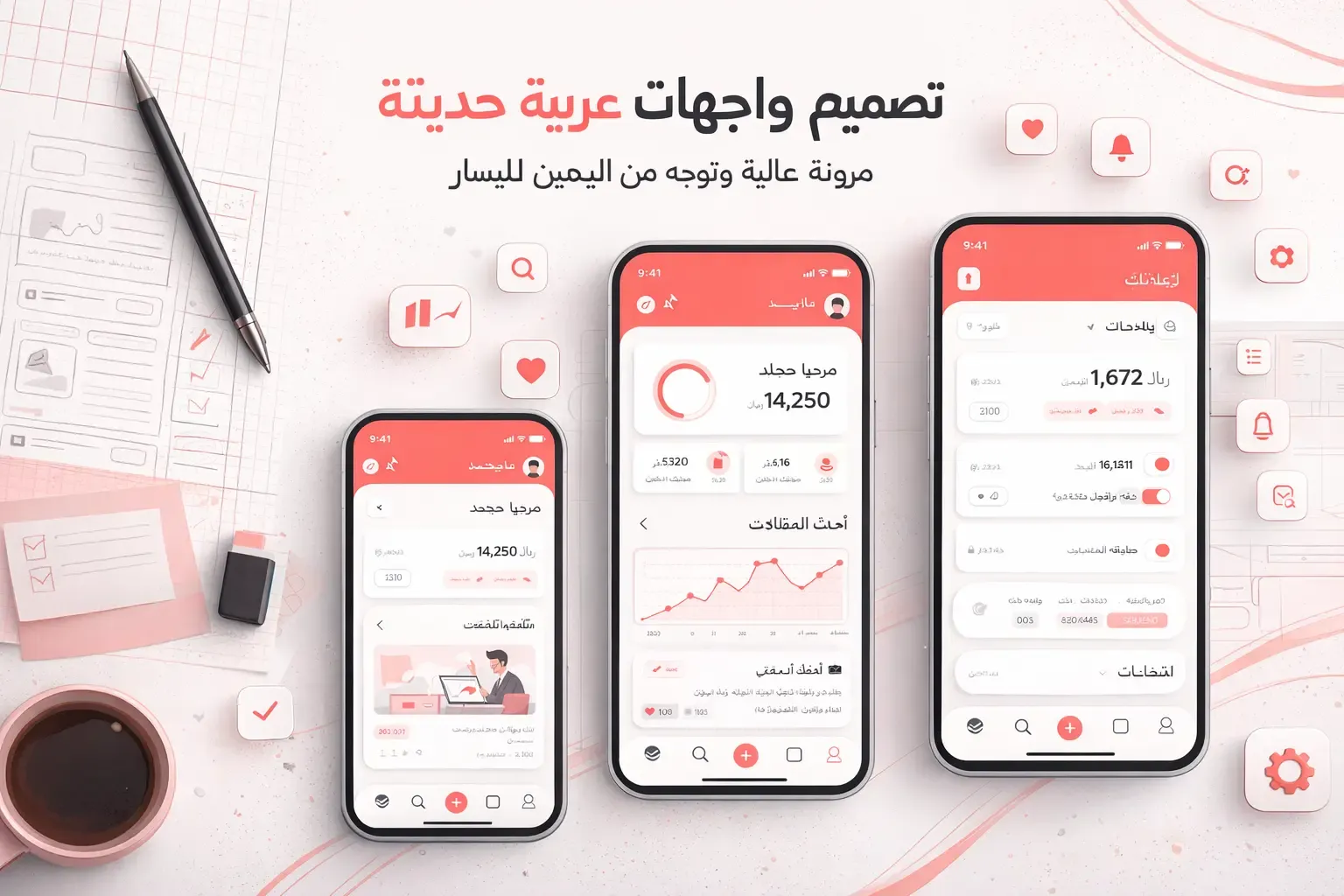
Designing a mobile app interface for Arabic speakers requires more than simply translating text. Arabic uses a right-to-left (RTL) writing system, which fundamentally changes how user interfaces should be structured. Layout direction, navigation flow, typography, and icon placement must all adapt to ensure the application feels natural for Arabic users.
As mobile adoption continues to grow across the Middle East and North Africa, companies expanding into Arabic markets must prioritize culturally appropriate and technically accurate RTL design. A well-designed interface improves usability, increases engagement, and builds trust with local users.
This guide explains the key principles of designing mobile app interfaces for Arabic speakers and how to create a seamless RTL user experience.
Understanding RTL Design in Mobile Interfaces
RTL design means that the primary reading and interaction flow begins on the right side of the screen and moves toward the left. This is the opposite of the left-to-right (LTR) layouts commonly used for English and many other languages.
When designing apps for Arabic users, the interface must reflect this reading pattern.
Core RTL layout changes include:
- Navigation starting from the right side
- Text alignment shifting to the right
- Content flowing from right to left
- Icons and directional elements flipping orientation
If the layout remains LTR while the language is Arabic, the interface feels unnatural and difficult to use.
Why RTL Optimization Matters for Arabic Users
Arabic is spoken by hundreds of millions of people across the Middle East and North Africa. In countries such as the UAE, Saudi Arabia, Qatar, and Kuwait, mobile apps that support Arabic usability gain stronger adoption among local audiences.
Proper RTL design helps businesses achieve:
- Higher user engagement
- Better accessibility for native speakers
- Improved app ratings and retention
- Stronger trust among regional customers
Companies targeting Arabic markets should treat localization as a fundamental product requirement rather than a secondary feature.
Key RTL Layout Principles for Mobile Apps
Designing RTL interfaces requires careful adjustment of layout structures. Many UI components must mirror their standard positions to match Arabic reading flow.
Important layout adjustments include:
- Navigation menus placed on the right side
- Back buttons appearing on the right instead of left
- Progress indicators flowing from right to left
- Content cards aligned with RTL structure
For example, if an English app shows a “next” arrow pointing right, the Arabic version should flip the arrow to point left.
Mirroring the entire interface ensures consistency and intuitive interaction.
Text Alignment and Typography for Arabic UI
Arabic typography behaves differently from Latin scripts. The characters connect differently and the script contains varying letter shapes depending on position within a word.
When designing Arabic UI text:
- Align paragraphs to the right
- Use fonts optimized for Arabic readability
- Avoid excessive letter spacing
- Maintain consistent line height for clarity
Popular Arabic-friendly fonts for mobile interfaces include:
- Cairo
- Noto Sans Arabic
- IBM Plex Arabic
- Tajawal
These fonts maintain legibility across different screen sizes while supporting modern mobile interfaces.
Mirroring Icons and Directional Elements
Many icons in mobile applications represent direction or movement. When converting a design to RTL format, these icons must also flip orientation.
Examples include:
- Back arrows
- Forward arrows
- Navigation indicators
- Timeline progress bars
However, not all icons should be mirrored.
Icons representing universal concepts such as:
- play buttons
- media controls
- logos
- brand icons
usually remain unchanged.
Designers must carefully evaluate each icon to determine whether mirroring improves usability.
Navigation Design for RTL Apps
Navigation plays a major role in usability. In RTL interfaces, users expect important controls to appear on the right side of the screen.
Common RTL navigation patterns include:
- Hamburger menu positioned on the right
- Tab navigation aligned from right to left
- Swipe gestures adjusted for RTL behavior
- Right-aligned search bars and filters
These adjustments help users interact with the app naturally without cognitive friction.
Designing Forms for Arabic Users
Forms are common in many applications, including e-commerce platforms, booking apps, and service platforms.
When designing forms for RTL users:
- Place labels and fields aligned to the right
- Align validation messages with RTL text flow
- Ensure numeric inputs remain readable
- Use clear spacing for longer Arabic words
Designing forms carefully reduces input errors and improves overall usability.
Supporting Bilingual Interfaces (Arabic and English)
Many apps in the Middle East support both Arabic and English users. In such cases, the interface must dynamically switch between RTL and LTR layouts depending on the selected language.
Best practices include:
- Designing mirrored layouts from the beginning
- Using flexible grid systems
- Testing language switching behavior thoroughly
- Ensuring icons adjust automatically where necessary
Building bilingual support early prevents costly redesigns later.
UX Testing for Arabic Mobile Apps
Even well-designed RTL layouts should be validated through usability testing with real users.
Testing helps identify issues such as:
- confusing navigation flow
- misaligned text elements
- incorrect icon orientation
- inconsistent RTL transitions
User testing ensures the application truly meets the expectations of Arabic speakers rather than relying solely on design assumptions.
Common RTL Design Mistakes to Avoid
Many apps attempt partial RTL support but fail to implement it correctly.
Common mistakes include:
- Translating text without changing layout direction
- Leaving navigation elements in LTR positions
- Using fonts that do not support Arabic properly
- Forgetting to flip directional icons
These issues can make the app feel poorly localized and reduce user trust.
The Role of UX Design in Arabic App Success
Strong RTL design is part of a broader user experience strategy. Mobile applications must combine usability, accessibility, and visual clarity to succeed in competitive markets.
Businesses expanding into Arabic-speaking markets often rely on professional UI UX design strategies to ensure their apps deliver a seamless user experience across languages and cultures.
Well-structured UX design improves engagement, reduces friction, and encourages long-term user retention.
Conclusion
Designing mobile apps for Arabic speakers requires careful attention to RTL layout principles, typography, navigation patterns, and localization details. Simply translating text is not enough to create a natural user experience.
Successful RTL design mirrors interface layouts, aligns navigation with Arabic reading patterns, and ensures icons, forms, and interactions follow the correct direction.
Businesses entering Middle Eastern markets should treat RTL support as a fundamental part of product design. Combining thoughtful localization with expert UI UX design and scalable custom web development helps create mobile applications that truly resonate with Arabic users.
FAQs
What is RTL design in mobile apps?
RTL design refers to interfaces structured for right-to-left languages like Arabic, where content and navigation start from the right side of the screen.
Why is RTL design important for Arabic users?
RTL layouts match the natural reading direction of Arabic speakers, making apps easier and more intuitive to use.
Do all elements need to be mirrored in RTL design?
No, directional elements like arrows should flip, but universal icons such as logos and media controls usually remain unchanged.
Which fonts work best for Arabic mobile apps?
Fonts like Cairo, Tajawal, Noto Sans Arabic, and IBM Plex Arabic provide good readability for mobile interfaces.
Can an app support both Arabic and English layouts?
Yes, many apps support bilingual interfaces by switching between RTL and LTR layouts depending on the selected language.
What are common RTL UI design mistakes?
Typical mistakes include not flipping layouts, using incompatible fonts, and leaving navigation in LTR positions.
How do designers test RTL interfaces?
Designers conduct usability testing with Arabic users to ensure navigation, text alignment, and interaction flows work correctly.
Is RTL support necessary for apps targeting the Middle East?
Yes, supporting Arabic RTL layouts significantly improves user experience and adoption in Arabic-speaking markets.


Ready to Elevate Your Brand?
Start Your Project Today