March 10, 2026
How to Design a Mobile App Interface for Arabic Users RTL UI Guide 2026
Milaaj Editorial / Research Insights
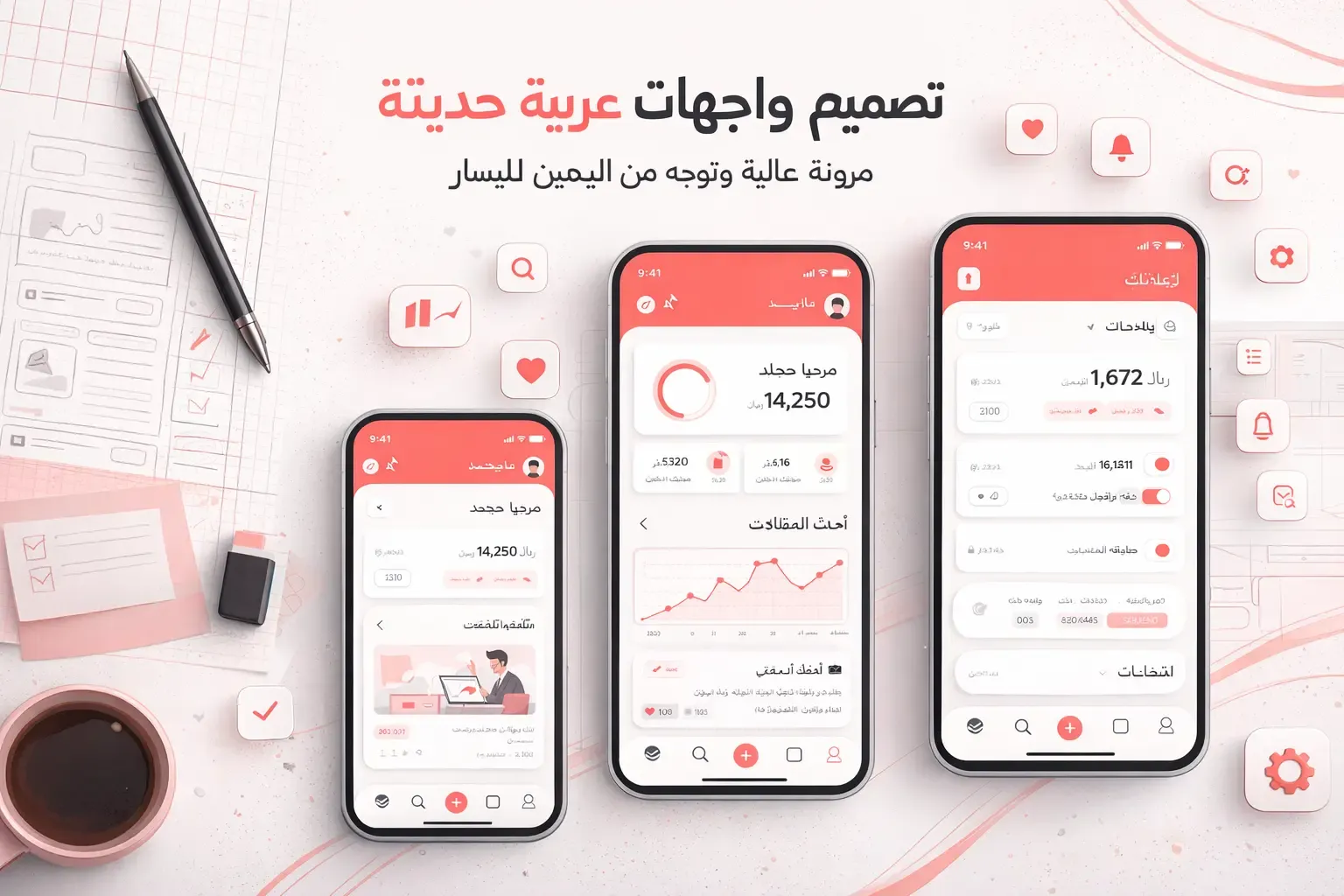
Designing a mobile app interface for Arabic users requires more than simply translating text. Arabic uses a right to left RTL writing system, which fundamentally changes how mobile app UI and UX design should be structured. Layout direction, navigation flow, typography, and icon placement must all adapt to ensure the application feels natural and intuitive.
As mobile app usage continues to grow across the Middle East and North Africa, businesses expanding into Arabic markets must prioritize proper RTL UI design and localization. A well designed Arabic app interface improves usability, increases engagement, and builds trust with local users.
This guide explains the best practices for Arabic mobile app design, including RTL layout, user experience optimization, and localization strategies.
Understanding RTL Design in Mobile Interfaces
RTL design means that the primary reading and interaction flow begins on the right side of the screen and moves toward the left. This is the opposite of left to right LTR layouts commonly used in English mobile apps.
When designing mobile apps for Arabic users, the entire user interface must reflect this reading pattern to ensure a seamless experience.
Core RTL layout changes include:
- Navigation starting from the right side
- Text aligned to the right
- Content flowing from right to left
- Directional icons flipped where necessary
If an app keeps an LTR layout while using Arabic language content, it creates confusion and reduces usability.
RTL vs LTR UI Design Differences
Understanding how RTL and LTR interfaces differ helps designers avoid usability issues and create intuitive mobile app experiences.
In LTR design, users read and interact from left to right, with navigation elements usually placed on the left side. In RTL design, everything shifts to match Arabic reading behavior. Navigation appears on the right, text is right aligned, and user interaction flows from right to left.
Progress indicators, sliders, and swipe gestures also follow this reversed direction. Back buttons that normally appear on the left in English apps are placed on the right in Arabic interfaces.
These structural adjustments are essential for creating a user friendly Arabic mobile app UI.
Why RTL Optimization Matters for Arabic Users
Arabic is spoken by millions of users across the UAE, Saudi Arabia, Qatar, Kuwait, and other MENA regions. Mobile apps that support Arabic UI design and RTL layouts achieve better adoption and engagement in these markets.
Proper RTL optimization helps businesses achieve:
- Higher user engagement and session duration
- Improved mobile app usability for Arabic speakers
- Better app store ratings and reviews
- Increased trust and brand credibility
For companies targeting Arabic audiences, RTL support is not optional. It is a core requirement for mobile app success.
Key RTL Layout Principles for Mobile Apps
Designing an RTL mobile interface requires careful layout adjustments. Every element should follow Arabic reading flow to ensure consistency and usability.
Important RTL UI design principles include:
- Navigation menus placed on the right side
- Back buttons positioned on the right
- Content aligned to the right side of the screen
- Progress indicators moving from right to left
For example, a next arrow in an English app points to the right. In an Arabic mobile app interface, it should point to the left.
Mirroring the layout correctly ensures a natural and intuitive user experience.
How UI Components Adapt in RTL Design
In addition to layout, individual UI components must be optimized for RTL behavior. This is essential for creating a consistent mobile app user experience.
Key UI adjustments include:
- Buttons with text and icons aligned for right to left interaction
- Cards with images and text structured for right side scanning
- Carousels that swipe from right to left
- Dropdown menus opening from the right
- Popups and modals appearing from the right side
Optimizing UI components improves usability and ensures the mobile app feels native to Arabic users.
Text Alignment and Typography for Arabic UI
Arabic typography differs significantly from Latin scripts. Letters connect and change shape depending on their position within a word, making font selection critical for mobile UI design.
Best practices for Arabic typography include:
- Aligning text to the right
- Using Arabic optimized fonts
- Avoiding excessive spacing between letters
- Maintaining proper line height for readability
Popular Arabic fonts for mobile app UI design include Cairo, Noto Sans Arabic, IBM Plex Arabic, and Tajawal. These fonts ensure readability across different screen sizes and devices.
Mirroring Icons and Directional Elements
Icons that represent direction must follow RTL interaction patterns. This ensures users can navigate the app without confusion.
Icons that should be flipped include:
- Back and forward arrows
- Navigation indicators
- Progress timelines
However, not all icons should change. Universal icons such as play buttons, logos, and brand symbols usually remain unchanged.
Designers must evaluate each icon carefully to maintain usability and consistency.
Navigation Design for RTL Apps
Navigation plays a key role in mobile app usability. In Arabic UI design, users expect important controls to be easily accessible from the right side.
Common RTL navigation patterns include:
- Hamburger menus placed on the right
- Tab bars aligned from right to left
- Swipe gestures adjusted for RTL interaction
- Search bars and filters positioned on the right
These adjustments reduce friction and improve the overall mobile app user experience.
Designing Forms for Arabic Users
Forms are essential in mobile apps such as ecommerce platforms, booking systems, and service applications. Proper RTL form design improves accuracy and user satisfaction.
Best practices include:
- Right aligned labels and input fields
- RTL friendly validation messages
- Clear display of numeric inputs
- Proper spacing for longer Arabic text
Well designed forms reduce user errors and increase form completion rates.
Supporting Bilingual Interfaces Arabic and English
Many mobile apps in the Middle East support both Arabic and English users. These apps must switch between RTL and LTR layouts dynamically.
Best practices for bilingual mobile app design include:
- Designing flexible layouts that support both directions
- Using responsive grid systems
- Testing language switching thoroughly
- Ensuring icons and UI elements adapt correctly
Planning bilingual support early helps avoid redesign and improves scalability.
Cultural Considerations in Arabic UX Design
Arabic mobile app design is not only about language and layout. Cultural preferences also influence user behavior and expectations.
Key cultural UX factors include:
- Preference for structured and clear interfaces
- Importance of trust signals such as reviews and familiar layouts
- Sensitivity to imagery and color usage
- Use of formal or region specific Arabic language
Understanding these factors helps create a more relatable and user friendly mobile experience.
UX Testing for Arabic Mobile Apps
Usability testing is essential for validating RTL mobile app design. Testing with real Arabic users helps identify issues that may not be visible during design.
Common issues identified during testing include:
- Confusing navigation flow
- Misaligned UI elements
- Incorrect icon direction
- Poor RTL transitions
User testing ensures the app delivers a smooth and intuitive experience.
Tools and Technologies for RTL Design
Implementing RTL design requires the right tools and development practices.
Common tools and technologies include:
- CSS direction rtl for layout control
- Figma with RTL design support
- Frontend frameworks like React and Flutter
- Localization and translation tools
Using these tools helps developers and designers build scalable RTL mobile applications efficiently.
Examples of Apps with Effective RTL Design
Many global mobile apps have successfully implemented Arabic RTL interfaces.
Examples include:
- Instagram which mirrors UI layouts and navigation effectively
- WhatsApp which delivers a seamless RTL messaging experience
These apps show how proper RTL UI implementation improves usability and engagement.
Common RTL Design Mistakes to Avoid
Many mobile apps fail to implement RTL design correctly, leading to poor user experience.
Common mistakes include:
- Translating content without changing layout direction
- Keeping navigation in LTR format
- Using fonts that do not support Arabic properly
- Not flipping directional icons
Avoiding these mistakes is essential for building a high quality Arabic mobile app.
RTL Design Checklist for Mobile Apps
- Mirror layout correctly from right to left
- Align text and UI elements properly
- Flip directional icons where required
- Use Arabic optimized fonts
- Support bilingual switching
- Test with real Arabic users
This checklist helps ensure your mobile app meets essential RTL design standards.
How RTL Design Impacts App Growth and Conversions
RTL mobile app design directly affects business performance in Arabic markets. A well localized app improves user engagement and increases conversions.
Benefits include:
- Higher retention rates in MENA markets
- Improved app store ratings
- Increased user engagement
- Better conversion rates
Businesses expanding into Arabic markets benefit from professional UI UX design services in Dubai that ensure high performing and culturally aligned mobile applications.
The Role of UX Design in Arabic App Success
Strong RTL design is part of a broader mobile app UX strategy. Apps must combine usability, accessibility, and visual clarity to succeed in competitive markets.
Companies targeting Arabic audiences often rely on expert UI UX strategies to deliver seamless digital experiences. Combining RTL optimization with mobile app development in Dubai helps build scalable and high performance applications.
Conclusion
Designing a mobile app interface for Arabic users requires a deep understanding of RTL layout, typography, navigation, and cultural expectations. Translating text alone is not enough to create a seamless experience.
Successful Arabic mobile app design aligns every element with right to left interaction patterns while ensuring usability and consistency.
Businesses entering the Middle East market should treat RTL design as a core part of their mobile app strategy. Partnering with experts in custom software development in Dubai ensures your app is optimized for both user experience and business growth.
If you are planning to build or optimize an Arabic mobile app, working with Milaaj Brandset can help you create high performance, user friendly applications tailored for MENA audiences. From UI UX design to mobile app development and localization, the team ensures your app delivers a seamless RTL experience that drives engagement and conversions.
FAQs
How do you design a mobile app for Arabic users
Design with RTL layout, right aligned text, mirrored navigation, Arabic fonts, and test with native Arabic users.
What is RTL design in mobile apps
RTL design structures the interface from right to left for languages like Arabic, affecting layout and navigation flow.
What is the difference between RTL and LTR UI design
RTL starts from the right side while LTR starts from the left, with mirrored layouts and navigation patterns.
Do iOS and Android support RTL layouts
Yes, both platforms support RTL layouts, but proper implementation and testing are required.
Which fonts are best for Arabic mobile app UI
Cairo, Tajawal, Noto Sans Arabic, and IBM Plex Arabic are widely used for readability.
Do all icons need to be flipped in RTL design
No, only directional icons should flip, while logos and media icons remain unchanged.
Why is RTL design important for MENA markets
It improves usability, engagement, and trust, leading to better app performance.
Can one app support both Arabic and English layouts
Yes, apps can switch between RTL and LTR layouts using localization and responsive design.
Ready to Elevate Your Brand?
Start Your Project Today